
Not every music need begins with the dream of releasing a song. Sometimes the need is smaller and more immediate: a product video needs atmosphere, a social clip needs motion support, a landing page demo feels silent, or a creator wants a consistent sonic identity without starting from a blank audio timeline.
In those situations, an AI Music Generator is useful not because it promises artistic magic, but because it reduces uncertainty. It helps people move from “I know the feeling I want” to “Now I can hear a direction.”
That distinction matters. A lot of creative work is blocked by translation problems rather than idea problems. Someone knows they want reflective, uplifting, minimal, cinematic, playful, or intimate music. What they lack is the time or infrastructure to turn those adjectives into a testable track. A platform like ToMusic shortens that translation loop.
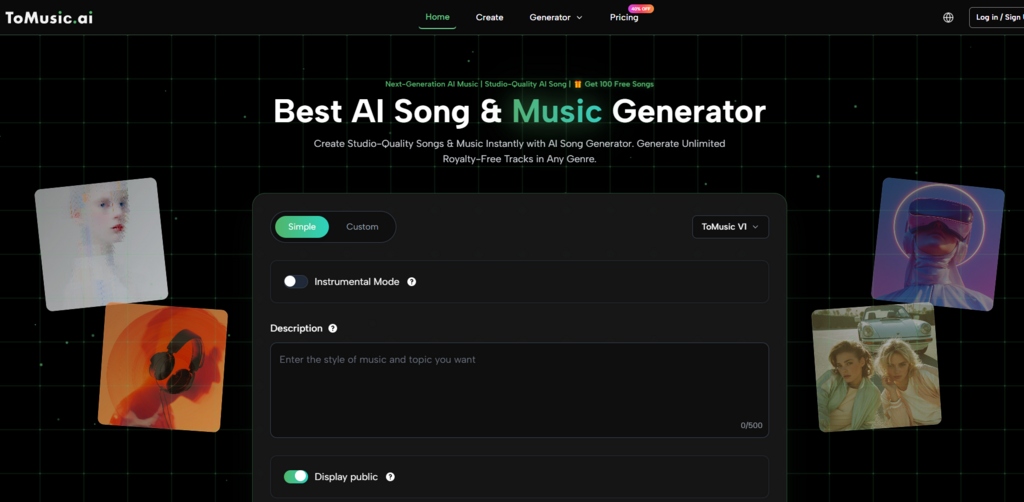
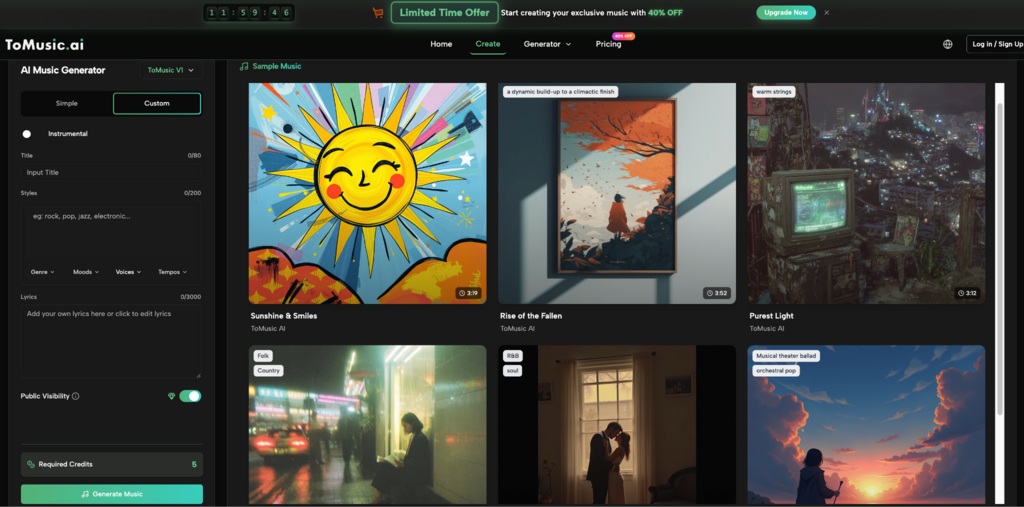
The official product design reflects this reality well. It does not force every user into lyric-heavy songwriting. The creation page includes an instrumental option alongside title, style, genre, mood, voice, tempo, and lyrics controls. That makes the platform useful for both full songs and non-vocal music tasks, which is a more realistic picture of how many people actually work with generated audio.
Why Instrumental Creation Deserves More Attention
Public discussion around AI music often focuses on vocals because vocals are easier to notice and easier to debate. But instrumental generation may be the more quietly practical feature for many users.
Background music often needs direction more than originality
For content work, the priority is often fit. The music needs to support pacing, reinforce mood, and avoid distracting from the main message. In that context, the goal is not always radical musical invention. It is contextual accuracy.
Speed matters when timing matters
A short-form video campaign, creator post, or internal presentation may need music today, not after a lengthy production cycle. If the platform can provide a credible tonal base quickly, that alone can be high-value.
How ToMusic Frames Usable Control
What stands out about ToMusic’s official interface is that it offers control categories ordinary users can understand without pretending to be a full production workstation. That is a strength, not a weakness.
Style fields keep requests from becoming shapeless
When users only type one loose sentence, outputs can drift. A separate styles field encourages more deliberate instruction and usually results in a more coherent musical center.
Genre and mood reduce ambiguity early
Mood words do not solve everything, but they help narrow emotional range. Genre cues do something similar on the structural side. Together, they give the model a more grounded task.
Tempo and voice choices reflect intended use
Tempo affects whether a track supports calm narration, fast edits, or dramatic transitions. Voice settings matter when vocals are involved, but even their presence on the page reminds users that music identity is partly performative, not just compositional.
What The Official Workflow Implies About Real Use
The platform’s visible process is simple enough to describe clearly: choose a mode and model, define the musical brief, generate the track, and keep results in your music studio. That may sound ordinary, but it reveals a useful philosophy. The tool assumes creation is iterative and library-based rather than a single one-off action.
| Workflow layer | Official page evidence | Why it matters |
| Setup | Model selection, mode choice, instrumental option | Users begin by deciding speed versus control |
| Briefing | Title, styles, genre, moods, voices, tempos, lyrics | The request is shaped before generation |
| Output | Generate Music action | The platform aims for quick conversion from idea to audio |
| Retention | My Music Studio | Results are meant to be reviewed, compared, and reused |
This is important because music generation becomes genuinely useful only when it fits a repeatable workflow. Random output is entertainment. Saved, comparable output is a process.
How To Approach Instrumental Requests Better
Many people use too little guidance when requesting instrumental music. They say “cinematic background music” and expect a highly specific result. In practice, instrumental prompting improves when you think in scenes and functions.
Describe context, not just genre labels
Instead of stopping at “ambient,” it often helps to imply the situation the music should support: product reveal, calm explanation, late-night reflection, upbeat tutorial, or emotional montage. Even when the interface uses categories rather than full narrative prompting, that mindset sharpens your selections.
Think in energy curves, not only mood words
A track that starts soft and grows gradually serves a different purpose from one that stays even and unobtrusive. The platform may not expose every production detail, but your style and tempo choices can still hint at the intended energy pattern.
Use instrumental mode when vocals are unnecessary
This sounds obvious, but many users keep vocals in play when they do not need them. If the music’s role is support rather than lyrical communication, instrumental generation often produces cleaner results for editing and brand use.
A Four-Step Workflow For Non-Song Use Cases
The official interface supports a concise four-step process that works especially well for background music and creator use.
Step 1. Choose the fast path or guided path
Start by selecting Simple mode for quick exploration or Custom mode if you already know the direction. Then choose the model and enable Instrumental if you want music without vocals.
Step 2. Define the emotional and functional brief
Set the title and styles, then choose genre, mood, and tempo signals that match the actual purpose of the track. Think about the job the music must do, not just the genre it resembles.
Step 3. Generate and judge the fit, not only the sound
After generation, listen in terms of placement. Could this live under a video, intro, explainer, or campaign asset? A technically decent track may still be wrong if it competes with the message.
Step 4. Store outputs for comparison and reuse
Use the saved library inside the studio to compare versions. This is where Text to Music becomes useful even for people who are not writing songs, because text instructions can still generate functional music drafts.
Where To Music Can Fit Into Everyday Production
The platform makes sense in more situations than people usually admit, especially when music is part of a larger workflow rather than the only output.
Short-form creators can build consistent tonal identity
Consistency is often more valuable than novelty. If a creator develops a repeatable style brief, the resulting tracks can support a recognizable channel atmosphere.
Marketing teams can test campaign mood quickly
Before licensing, editing, or commissioning anything more involved, a team can use generated music to validate tone. This helps narrow discussion from vague adjectives to audible references.
Solo founders and product makers can prototype brand feeling
Many early product demos and launch videos suffer from silence or mismatched stock music. A platform like ToMusic can help establish a first-pass sonic identity without heavy setup.
Writers and educators can add emotional scaffolding
Not every educational or narrative project needs a full soundtrack, but even subtle background music can change retention and pacing. Fast generation lowers the barrier to trying that layer.
What Limits Still Matter In Real Use
No serious description of the platform should ignore its limits. The tool speeds up audio drafting, but it does not remove the need for listening discipline.
Prompt clarity still influences coherence
If your style instructions are too broad, the track may feel uncertain. The system is responsive, but it still needs a focused brief.
Generated convenience can create average choices
Because output arrives quickly, users may accept a merely adequate track too soon. This is especially common in content workflows where deadlines are tight.
Useful music is not always memorable music
That is acceptable in many cases. Background tracks often need to support rather than dominate. Still, it helps to know whether your goal is neutrality, identity, or emotional lift before you evaluate the result.
Why This Platform Matters As A Practical Tool
ToMusic is easiest to understand when you stop asking whether it replaces traditional composition and start asking whether it improves decision speed. In many real-world contexts, that is the more relevant question.
The platform’s official controls support that practical reading. You can choose a mode, decide on instrumental or vocal output, provide style and mood direction, generate quickly, and keep the results inside a reusable studio workflow. That combination makes it useful for more than novelty experiments.
In my view, its strongest value appears when music is needed as part of a broader communication task. A creator needs atmosphere. A marketer needs tone. A founder needs a first-pass sonic identity. A writer needs emotional support for a piece of media. In all of those cases, the platform helps convert abstract language into something you can actually hear, compare, and improve.
That is why the tool is worth taking seriously. Not because it ends the need for musical judgment, but because it makes musical judgment easier to apply when time, resources, or technical skill would otherwise delay the entire process.
